

Connect a gateway to an API-key upstream MCP server
Not every upstream MCP server uses OAuth. Many authenticate with a static API key. The Zuplo MCP Gateway fronts these the same way it fronts OAuth upstreams: clients still authenticate to the gateway with whatever inbound auth you choose (including OAuth), and the gateway swaps in the upstream API key before forwarding.
This example sends the key as a Bearer token in the Authorization header,
which is the most common shape. Any other API key scheme works the same way: the
upstream might expect the key in a custom header (such as X-API-Key), a
different prefix, or no prefix at all. You set whatever header name and value
the upstream requires in the same policy.
The flow has two parts:
- Run the MCP Gateway Virtual Server wizard, choosing a Custom upstream and None for outbound auth.
- Add an Add or Set Request Headers policy to the end of the policy stack
that sets the
Authorizationheader to the upstream's API key, read from an environment variable.
This means you can put OAuth (or any inbound auth) in front of an API-key-only MCP server and add it to any client you like.
Run the wizard with a custom upstream
Follow the Portal quickstart to start an MCP Gateway Virtual Server, with these choices:
- Upstream: select the Custom tab instead of a library server. Set a Name, the MCP Server URL (the upstream provides this), and the Path you want to expose on your gateway.
- Inbound Auth: pick whatever your clients should authenticate with. OAuth through an identity provider works exactly as it does for OAuth upstreams.
- Tools: choose Passthrough or Curate as usual.
- Outbound Auth: choose None, then set the inbound
Authorizationheader handling to Remove auth token. The upstream doesn't use OAuth, so the gateway shouldn't run a token exchange, and the inbound client's token must be stripped before forwarding so it doesn't leak to the upstream.
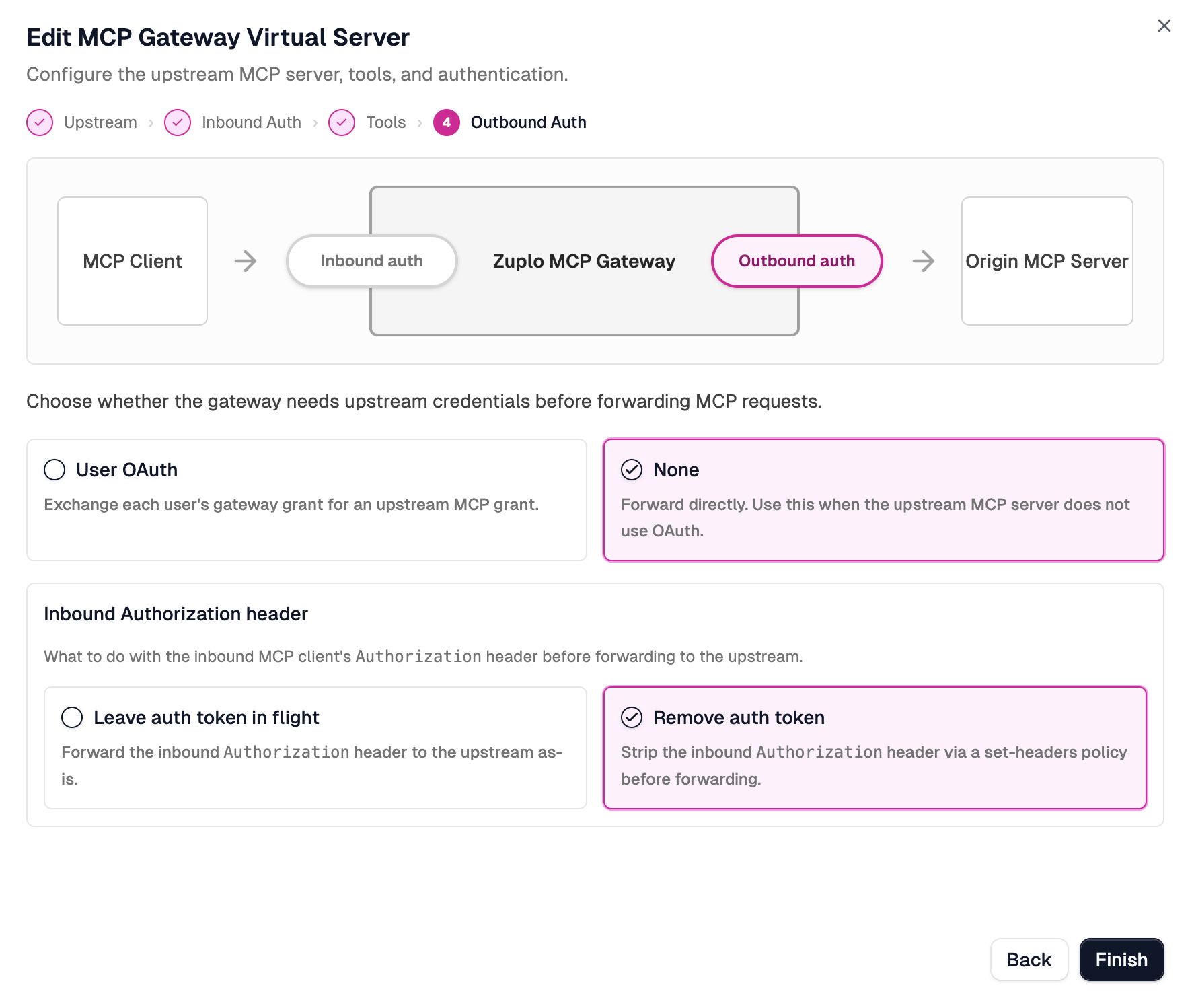
Click Finish. The wizard scaffolds the route, the inbound auth policy, a
capability filter (if you curated), and a remove-authorization-header policy
that strips the inbound token.
Set the upstream API key
The upstream still expects its API key. Add it as an environment variable so the secret stays out of source control.
Open your project's Settings from the navigation bar, click Environment
Variables under Project Settings, and add a variable for the upstream key, for
example CONTEXT7_API_TOKEN. Check the Secret box so the value is hidden in
the encrypted secret store, then click Save.
A new deployment is needed for environment variable changes to take effect.
Inject the key with a set-headers policy
Now add the upstream credential. The Add or Set Request Headers policy
(set-headers-inbound) sets the
Authorization header on the request before it leaves the gateway.
Open the route's policy stack and click Add Policy at the end of the
inbound stack, after the remove-authorization-header policy the wizard added.
Order matters: the inbound token is removed first, then your upstream key is
set.
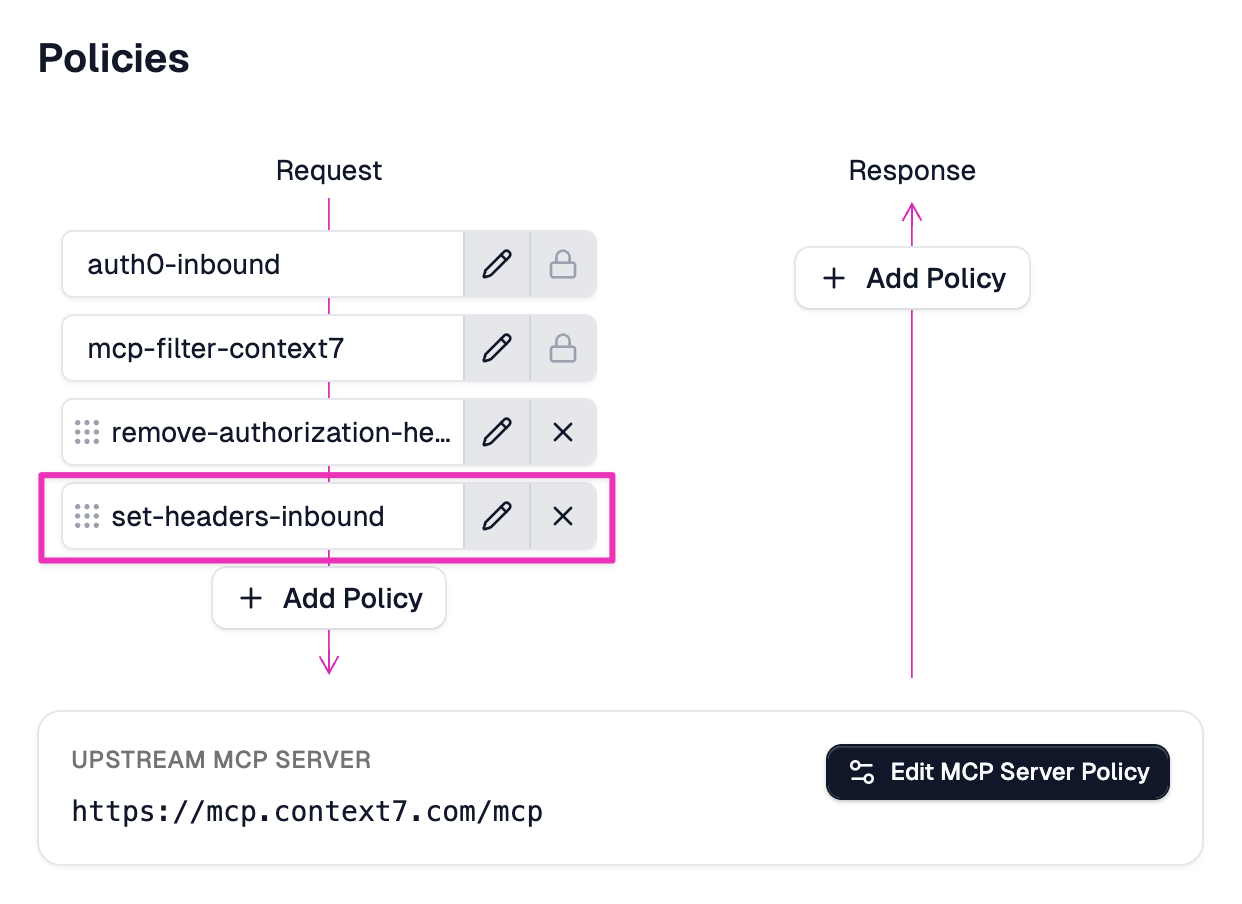
Configure the policy to set the Authorization header to the upstream API key,
referencing the environment variable with $env(...):
set-headers-inbound policy
Replace CONTEXT7_API_TOKEN with your own environment variable name. This
example uses a Bearer token in the Authorization header, but the policy sets
any header you need. If the upstream expects the key in a different header (such
as X-API-Key), without the Bearer prefix, or as a raw value, change name
and value to match. For a key that lives in a custom (non-Authorization)
header, the dedicated
set-upstream-api-key-inbound
policy is an alternative.
Save the project and deploy.
How the request flows
For each MCP request, the gateway now:
- Authenticates the client with your chosen inbound auth.
- Filters capabilities (if you curated tools).
- Removes the inbound
Authorizationheader so the client's token never reaches the upstream. - Sets the upstream API key header from your environment variable. In this
example,
Authorization: Bearer <upstream-key>. - Forwards the request to the upstream MCP server.
The result: clients authenticate to the gateway however you like, and the gateway presents the upstream's API key on their behalf.
Related
- MCP Gateway quickstart: the full wizard walkthrough.
- Connect an upstream OAuth provider: the OAuth equivalent of this guide.
set-headers-inboundpolicy: the Add or Set Request Headers policy reference.set-upstream-api-key-inboundpolicy: a dedicated policy for API keys in a custom (non-Authorization) header.McpProxyHandlerreference: the route handler that forwards to the upstream.